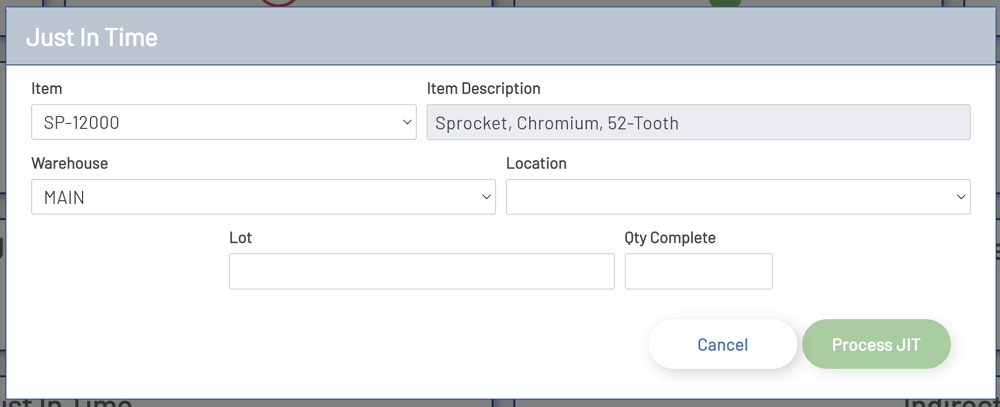
Just In Time, transactions are a convenient way to get assembled items into inventory without the need to create a job. There are a few exceptions to the types of items that are available for a Just In Time transaction. The item must be a standard cost item in the ERP system and the item must have a standard BOM set up for the assembly. If the item meets these criteria, then it is eligible for a Just In Time transaction. Below is a description of the fields in the Just In Time form.
To perform a Just In Time transaction, click the Just In Time transaction button on the main Shop Floor Pro page.
-
Item: This is a drop-down field that will have all standard cost assemblies that are in the ERP system.
-
Item Description: This is the description of the item that has been selected. This is read-only and will automatically populate after an item selection has been made.
-
Warehouse: This is a drop-down field that will populate with all warehouses that are available for the selected item. This data is read from the ERP system.
-
Location: This is a drop-down field that will populate with all locations that are available for the selected item and warehouse. This data is read from the ERP system.
-
Lot: This field will only be visible if the selected item is lot tracked.
-
Quantity: This is the quantity to move to inventory for the selected item.
Once all required fields have been populated, the Process JIT button will be enabled. Clicking the Process JIT button will consume all items for the BOM for the selected item and will add the quantity entered in the Quantity field to inventory for the selected item in the selected warehouse and location.
Just In Time