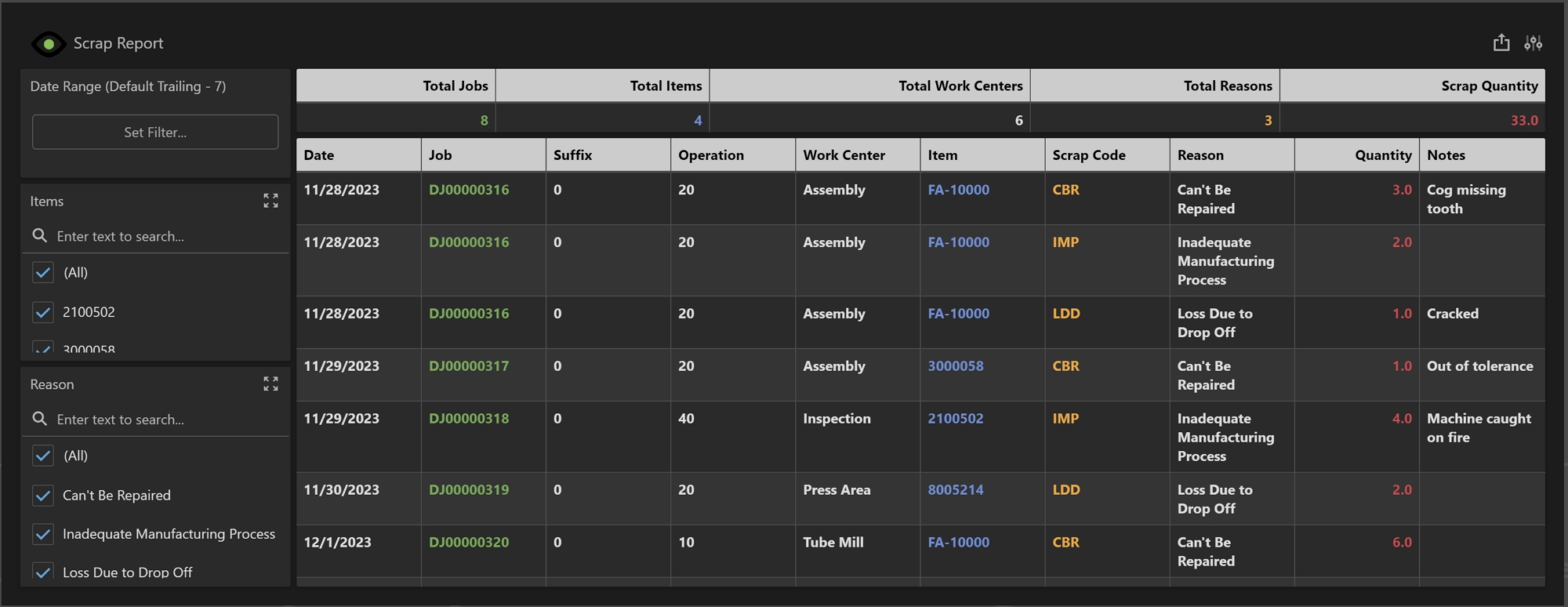
The Scrap Report displays data related to scrap captured over the last 31 days in Shop Floor Pro. This report can be filtered by date, item, and defect reason.
Note: Shop Floor Pro must be fully configured in Prophecy before this report will display any data.
Summary Grid
The Summary Grid displays totals based on the information in the Main Grid and will automatically update based on filter criteria.
-
Total Jobs: The count of unique jobs from the Main Grid..
-
Total Items: The count of all unique items from the Main Grid.
-
Total Work Centers: The count of all unique work centers from the Main Grid.
-
Total Reasons: The count of all unique reasons from the Main Grid.
-
Scrap Quantity: The sum of all scrap occurrences from the Main Grid.
Main Grid
The Main Grid displays a list of all scrap events by day.
-
Date: The date the scrap event occurred.
-
Job: The job scrap was logged against.
-
Suffix: The suffix for the job that the scrap event was logged against.
-
Operation: The operation for the job that the scrap event was logged against.
-
Work Center: The description of the work center the scrap event was logged against.
-
Item: The item for the job that scrap was logged against.
-
Scrap Code: The scrap code for the scrap event.
-
Reason: The scrap reason for the scrap event.
-
Quantity: The scrap quantity for the scrap event.
-
Notes: Scrap notes logged when the scrap event occurred.