The Manage Employees area of the Supervisor page allows supervisors to view information about employees, update employee permissions for Manufacturing Hub, assign supervisors to employees, and add a default Work Center for an employee. Employee information is read in from the ERP system.
Employee List
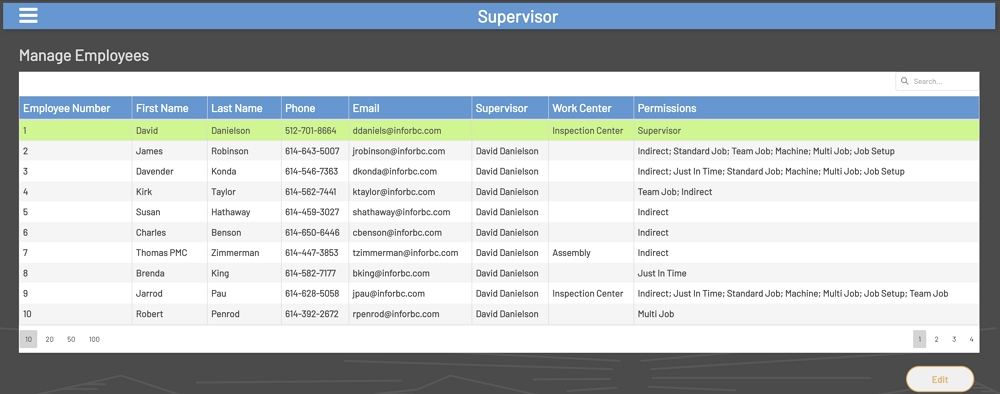
The 'Employee List' lists all employees that have been set up in the ERP system. The 'Employee List' has the following fields:
-
Employee Number: The employee number from the ERP system.
-
First Name: The employee’s first name from the ERP system.
-
Last Name: The employee’s last name from the ERP system.
-
Phone: The employee’s phone number from the ERP system.
-
Email: The employee’s email from the ERP system.
-
Supervisor: The supervisor that has been assigned to the employee in Manufacturing Hub. This is blank if the employee is a supervisor or if a supervisor has not been set for an employee.
-
Work Center: The default Work Center that has been assigned to the employee in Manufacturing Hub. This is blank if a Work Center has not been assigned.
-
Permissions: This is the list of permissions that have been assigned to the employee. If no permissions have been assigned, then this will be blank.
Manage Employees
Edit an Employee
To edit an employee, click on a row in the 'Employee List'. Once a row has been selected, the Edit button at the bottom of the 'Employee List' will be enabled.
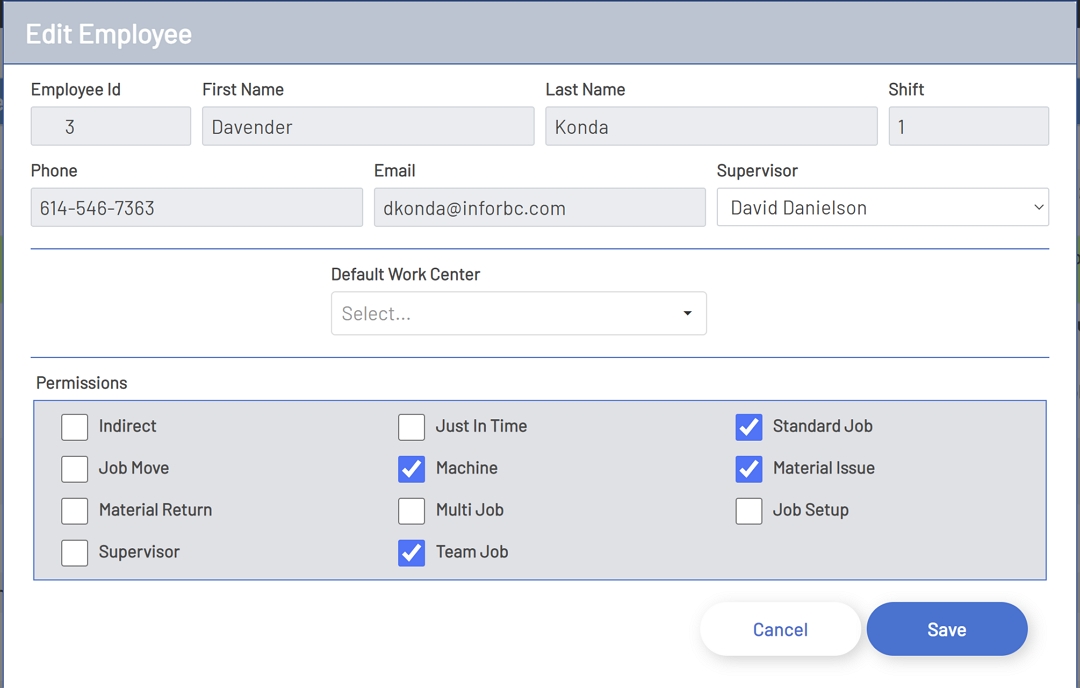
Once the Edit button has been clicked, a new form will open displaying information about the employee. The Edit Employee window has the following fields:
-
Employee Number: The employee number from the ERP system. This field is read-only.
-
First Name: The employee’s first name from the ERP system. This field is read-only.
-
Last Name: The employee’s last name from the ERP system. This field is read-only.
-
Phone: The employee’s phone number from the ERP system. This field is read-only.
-
Email: The employee’s email from the ERP system. This field is read-only.
-
Supervisor: This is a drop-down list displaying all supervisors that have been set up in Manufacturing Hub. If there have not been any supervisors set up, then this list will be empty. This field is required if the supervisor’s permission has not been added for an employee.
-
Default Work Center: This is a list of all Work Centers available in the ERP system. This field is optional. This drop-down can be automatically filtered when text it typed directly into the drop-down.
Edit Employee
Permissions
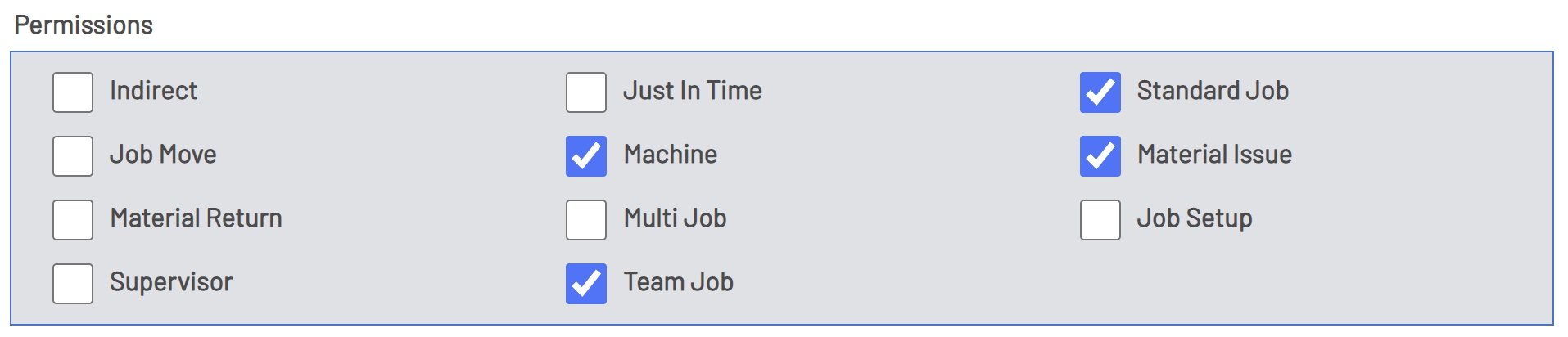
The permissions section allows the assignment of permissions to employees. An employee must be assigned at least one permission to save changes for the employee. Below is a list of the permissions that are available:
-
Indirect: If checked, this will allow the employee to perform Indirect transactions in Manufacturing Hub.
-
Job Move: If checked, this will allow the employee to perform Job Move transactions in Manufacturing Hub.
-
Job Setup: If checked, this will allow the employee to perform Job Setup transactions in Manufacturing Hub.
-
Just In Time: If checked, this will allow the employee to perform Just In Time transactions in Manufacturing Hub.
-
Machine: If checked, this will allow the employee to perform Machine transactions in Manufacturing Hub.
-
Material Issue: If checked, this will allow the employee to perform Job Material Issue transactions in Manufacturing Hub.
-
Material Return: If checked, this will allow the employee to perform Job Material Returns in Manufacturing Hub.
-
Multi Job: If checked, this will allow the employee to perform Multi Job transactions in Manufacturing Hub.
-
Supervisor: If checked, this will allow the employee to perform all transactions in Manufacturing Hub and access the Supervisor page.
-
Standard Job: If checked, this will allow the employee to perform Standard Job transactions in Manufacturing Hub.
-
Team Job: If checked, this will allow the employee to perform Team Job transactions in Manufacturing Hub.
Employee Permissions
NOTE: This page requires either admin access or the assignment of the Supervisor role in Prophecy and Manufacturing Hub.