Prophecy IoT Documentation
Current Version: 5.0
Available Versions: 5.1 | 4.6
Release Notes
  • Welcome to Prophecy IoT
  • Admin Settings
    • Overview
    • Change Log
    • Data Points
    • Diagram Screen Sizes
    • IDO Definitions
    • Import Export
    • Message History
    • Plant Overview External Urls
    • Settings
    • Shop Floor Pro Settings
    • SQL Connections
    • Tag Modifications
    • URL Aliases
    • User Permissions
  • Aggregations
    • Overview
    • Managing Rules
    • Configuring Rules
    • Events
    • Webhooks
    • Samples
    • Troubleshooting
  • Alarms
  • Authentication and Authorization
    • Overview
    • Roles
    • Permissions
    • API Access
  • BarTender
    • Overview
    • Adding Labels
    • Managing Labels
    • Managing Printers
    • Reprinting
  • Dashboards
    • Overview
    • Viewer Mode
    • Designer Mode
  • Diagrams
    • Overview
    • HMIs
    • Live Data Shapes
    • Button Shapes
    • User Input Shapes
    • Pie Chart Shapes
    • Bar Gauges
    • Data Point Values
    • Link Shapes
    • Trends
    • Shape Coloring
    • Shape Transforms
    • Text Rules
    • Workflows
    • Button Clickable Rules
    • Alarm Indicators
    • Live Mode
    • Tokens
    • Troubleshooting
  • Downtime
    • Overview
    • Setup
    • Timeline
  • Enterprise Explorer
    • Overview
    • Entities
    • Entity Management
    • Search and Filtering
    • Entity Nesting Rules
  • Miscellaneous
    • Favorites
    • Defaults
    • Styling
    • Database Output Format
  • Navigation
  • Plant Overview
    • Overview
    • Initial Set Up
    • Editing Views and Items
  • Prophecy Dashboards and Reports
    • Overview
    • Complete Vs Scrap
    • Downtime Data Report
    • Downtime Running Ratio
    • Downtime Top Machines
    • Downtime Top Reasons
    • Efficiency By Day
    • Labor Comparison
    • Labor Total
    • Labor Report
    • Parts Per Day
    • Planned To Actual Hours
    • Production Data Report
    • Scrap Report
    • Top Scrap Items
    • Top Scrap Reasons
    • Top Scrap Work Centers
    • Configuring Paramaters
  • Shop Floor Pro
    • Overview
    • Workstations
    • Modes
    • Top Menu
    • Clock Transactions
    • Job Transactions
    • Jobs List
    • Moves and Completions
    • Label Printing
    • Just In Time
    • Indirect
    • Supervisor
    • In Process Jobs
    • Employee Statuses
    • Manage Employees
    • Manage Teams
    • Send Alert
  • Tag Manager
    • Overview
    • Top Menu Bar
    • Tag Tree
    • Tag Editor
 
Prophecy IoT Documentation
  • Docs »
  • Summarization

Summarization

To obtain numeric values that should be displayed within a dashboard item, Dashboard calculates a summary function against the specified measure.

Summary Function Types

The following summary functions are available.

  • Count - The number of values (excluding Null and DBNull values).

    This is the only summary type that can be calculated against non-numeric data.

  • Count Distinct - The number of distinct values.

  • Sum - The sum of the values.

func_sum

  • Min - The smallest value.

  • Max - The largest value.

  • Average - The average of the values.

func_average

  • StdDev - An estimate of the standard deviation of a population, where the sample is a subset of the entire population.
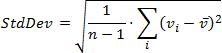
func_stddev

  • StdDevP - The standard deviation of a population, where the population is the entire data to be summarized.
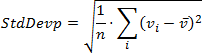
func_stddevp

  • Var - An estimate of the variance of a population, where the sample is a subset of the entire population.
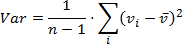
func_var

  • VarP - The variance of a population, where the population is the entire data to be summarized.
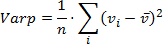
func_varp

Changing Summary Type

By default, Dashboard calculates Sum for numeric measures and Count for measures that contain another type of data.

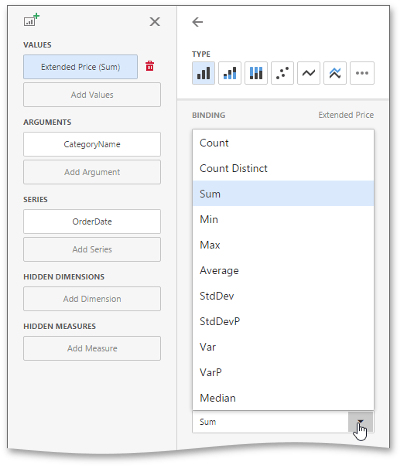
You can change the summary function type for numeric measures. To do this, invoke the dashboard item Bindings menu and select the required data item. In the drop-down Summary Type list, select the desired summary type.
wdd-change-summary-type


Copyright © 2022, Godlan Inc

Need help? Contact the Prophecy Consulting Group