The IDO Definitions page allows admins to create and manage the IDO Definitions used to connect Mongoose diagram shapes with Mongoose (which includes Infor Cloud Suite Industrial, or CSI).
Note that for any IDO call to work, one or more connections must first be configured. Those cannot be set up through the Prophecy site directly. Contact the Prophecy Consulting Group for help setting those up.
IDO Definitions
Generally speaking, Prophecy IDO Definitions will match up with Mongoose IDOs. It is possible to have multiple Prophecy IDO Definitions referencing the same Mongoose IDO, however, using different filters, operations, etc. (see below). Someone familiar with Mongoose IDOs should set these up in Prophecy, and be sure to use definition names that clearly explain what each does, so diagram designers can be sure which to use when configuring Mongoose data shapes.
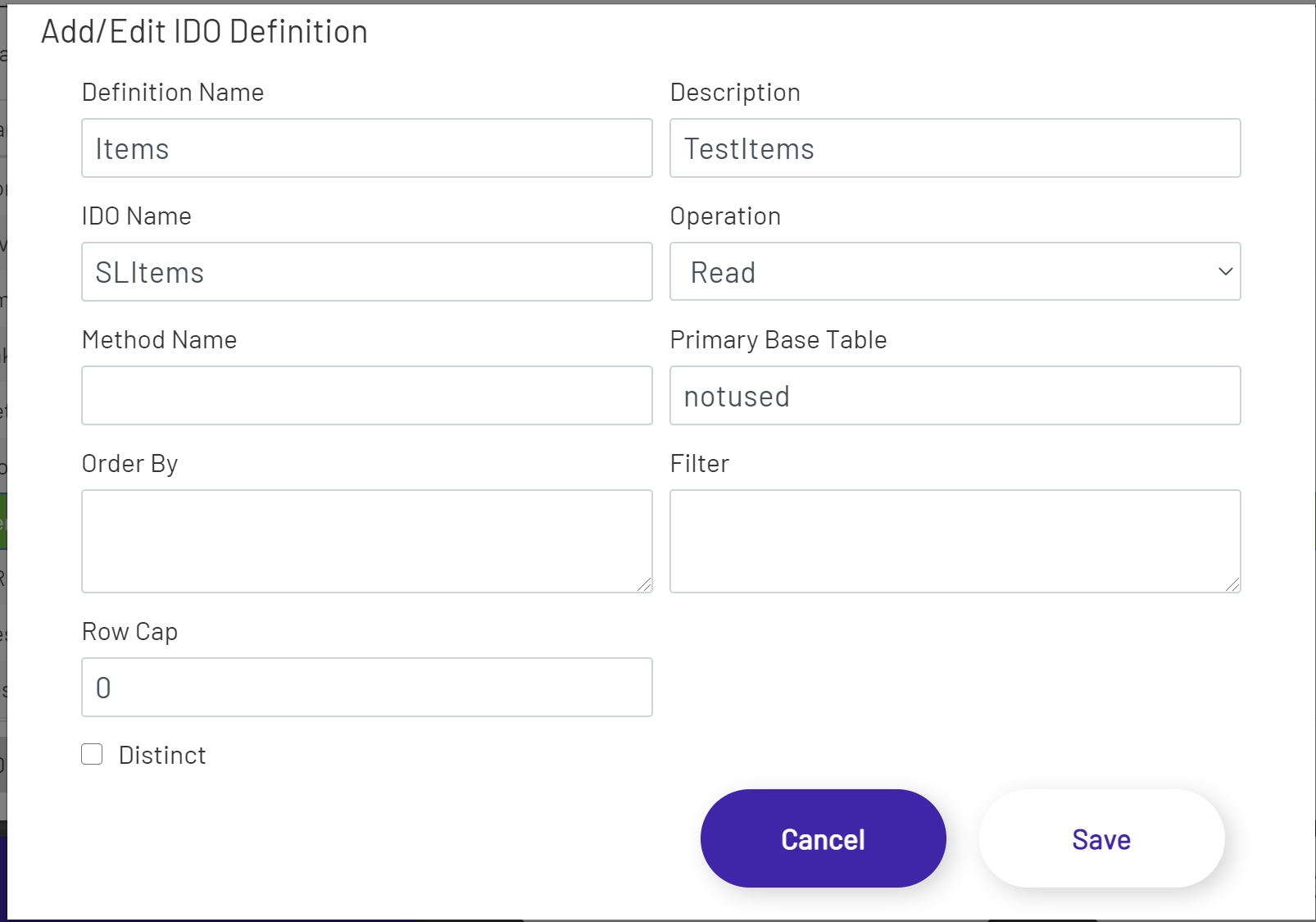
Each Prophecy IDO Definition has these settings:
- Definition Name: This is only used within Prophecy, and does not need to match the name of the Mongoose IDO being called. Since a Mongoose IDO may be referenced by multiple Prophecy IDO Definitions, it may be helpful to put something in the name to indicate what the IDO Definition is used for - 'Usernames Filtered', 'Usernames Unfiltered', etc.
- Description: This is for internal use only, to help explain what the IDO Definition should be used for within Prophecy.
- IDO Name: The name of the Mongoose IDO that this IDO Definition is being configured to call. The name must match exactly.
- Operation: This sets the type of operation the Mongoose integration will perform when calling the Mongoose IDO. Most Prophecy IDO Definitions will use Read or Upsert. Valid values are:
- Read
- Upsert
- Delete
- InvokeMethod
- FireEvent.
- Method Name: The name of the method that runs when the IDO call is an InvokeMethod or FireEvent operation.
- Filter: The filter value is used to restrict the list of rows returned or affected by an IDO call. An IDO Definition can specify multiple filter conditions, separated by ' AND ' or ' OR '. Each filter will be replaced by input from a diagram. Those parameters must be sequential integers, each wrapped in {} brackets. If the value of the parameter will be non-numeric, it should be wrapped in single quotes. An example filter might look like:
Username='{0}' AND Description='{1}' AND Count={2}. This field is optional.- Note: This filter uses SQL syntax (what you would specify for a "where" query clause).
- Order By: This is used to set the sort order of results returned by Read operations. This field is optional.
- Note: This order uses SQL syntax (what you would specify for an "order by" query clause).
- Row Cap: This is an integer value restricting the number of rows to return from Read operations. If this is set to 0, the Mongoose default of 200 will be used.
- Primary Base Table: This field isn't required, because in most cases there is only one Primary Base Table per IDO, and Mongoose will use that. However, if there is more than one, the name of the Primary Base Table must be specified here in order for Upsert operations to work correctly.
- Distinct: If this is checked, Read operations will only return distinct (non-duplicate) rows from CSI.
Note that these fields won't all be used by every IDO Definition. A simple example that could be used for inserting time and attendance records could look like this (do not copy this example without consulting with someone familiar with Mongoose):
IDO Properties
Each IDO Definition must have at least 1 IDO Property defined, and can have as many as are needed. Each property must match up to a property of the Mongoose IDO that the Prophecy IDO Definition references. If a diagram is trying to do inserts through a Mongoose IDO that has 7 required fields, for example, the Prophecy IDO Definition will have to have (at least) 7 IDO Properties defined.
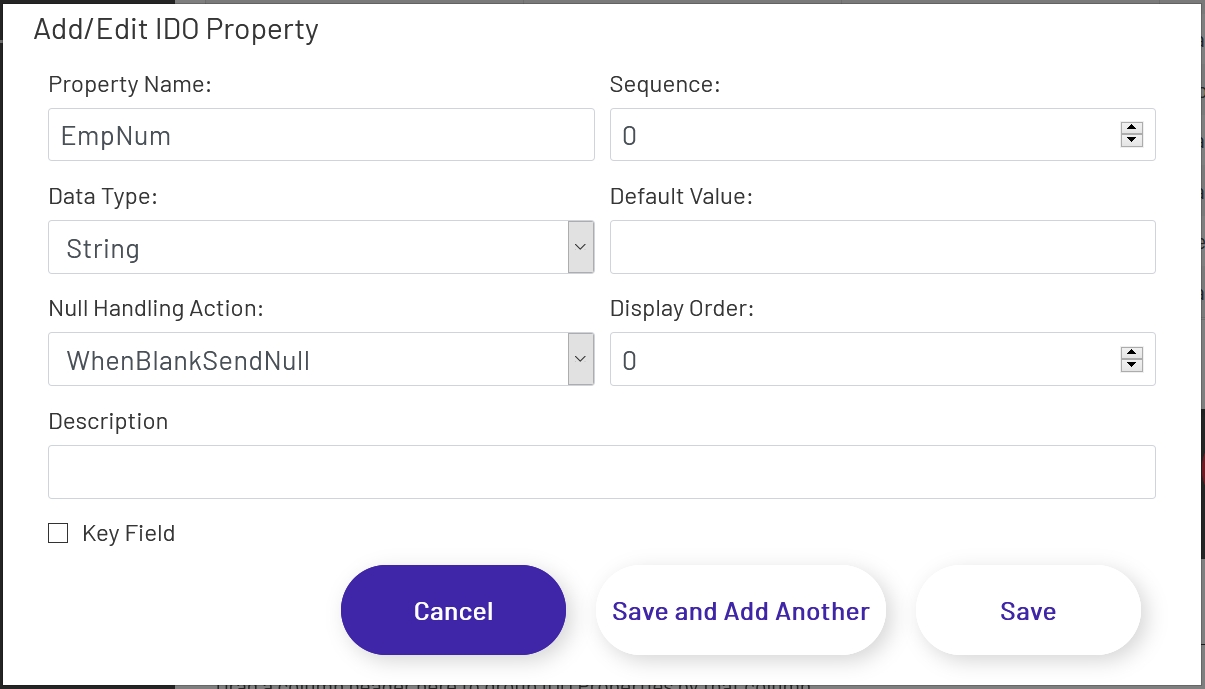
Each Prophecy IDO Property has these settings:
- Property Name: This must match the name of the Mongoose IDO property being referenced exactly.
- Sequence: If the Mongoose IDO requires that properties be provided in a set order, this field can be used to set that order. Properties are sorted by ascending order of Sequence, starting with 0.
- Data Type: This must match the data type of the Mongoose IDO property. If this value is set incorrectly or incompatible data is provided by a diagram input (submitting 'Bob' for an IDO Property with a Data Type of 'binary', for example) the Mongoose IDO call may fail.
- Default Value: If no value is provided by the diagram triggering the IDO call, this value will be substituted. This can be left blank, in which case the next setting will come into play if no value is provided by the diagram.
- Null Handling Action: This determines how an IDO Property will be handled if there is no value provided by the diagram triggering the IDO call, and no Default Value was set on the IDO Property. Different Mongoose IDO properties have different allowed values, so which of these handling actions is best will vary from call to call.
- WhenBlankOmit - the property will be left out of the Mongoose IDO call entirely.
- WhenBlankSendBlank - the property will have a value of empty string.
- WhenBlankSendNull- the property will have a null value.
- Display Order: This will be used to set the order in which fields display in the grid shape in diagrams.
- Description: This is for internal use only.
- Key Field: When this is checked, this IDO Property will be used by Upsert actions to identify the row to be updated. If this field isn't checked for any IDO Properties on an IDO Definition, then every Upsert action performed for that IDO Definition will try to insert a new row.
Preview
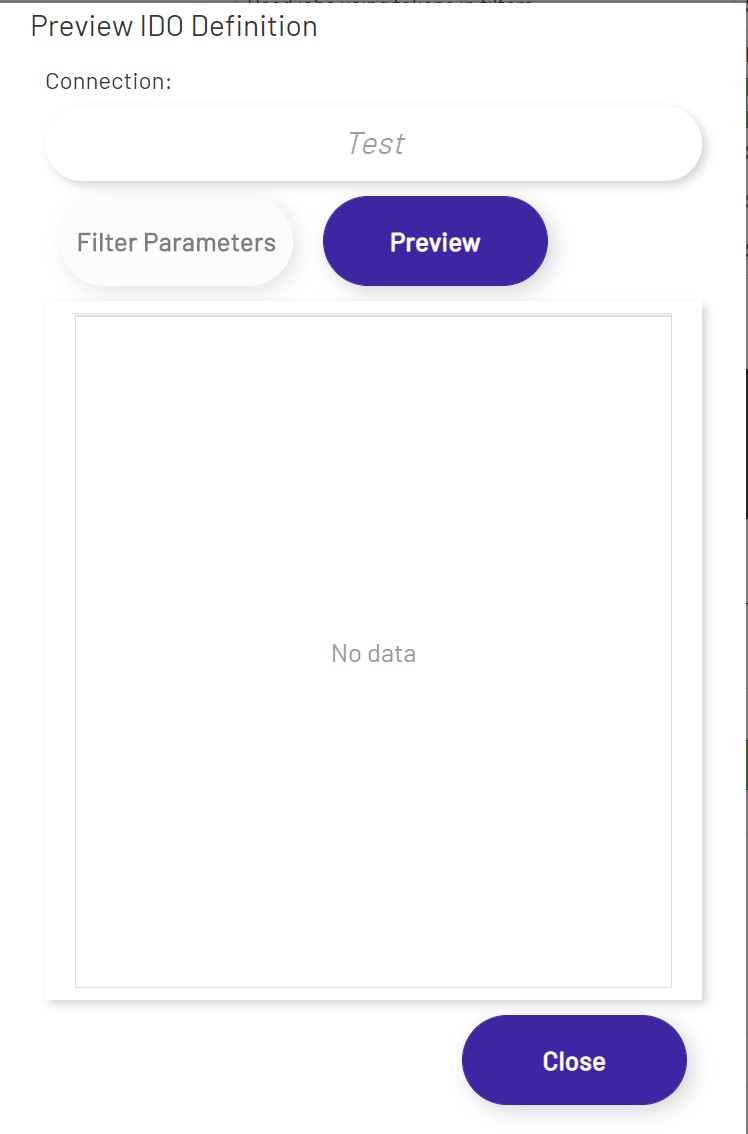
IDO Definitions can be tested by selecting them from the list of definitions, and then clicking the 'Preview' button at the lower left of the page. No matter what type of IDO operation or method is specified, a Read operation will be attempted. After choosing a connection (if there is only one, it will be pre-selected), click the grey 'Preview' button and the Mongoose IDO will be called and any results will be displayed in this grid. While it can only be used on limited IDO Definitions, it can be useful for ensuring that your Mongoose connection is configured properly and working.
If a Filter is specified, the 'Filter Parameters' button will be enabled, and you may use this to enter values in order to test the IDO definition.
Click the 'Preview' button to return the results of a Read operation.