Manufacturing Hub is an outlet to transactions being posted back to ERP. There are often instances that these transactions need review or times when these transactions are incorrect. Manufacturing Hub offers a convenient way to view, export, and edit any transactions that were created through Manufacturing Hub. These transactions may only be viewed and edited by Admins or Supervisors. When accessing as a Supervisor, only transactions created by the Supervisor or the Supervisors direct reports will be available. Admins will have access to all transactions.
To access the Transactions View, first navigate to the Supervisor page from the Manufacturing Hub main page by clicking Supervisor in the top menu bar.
Supervisor Selection

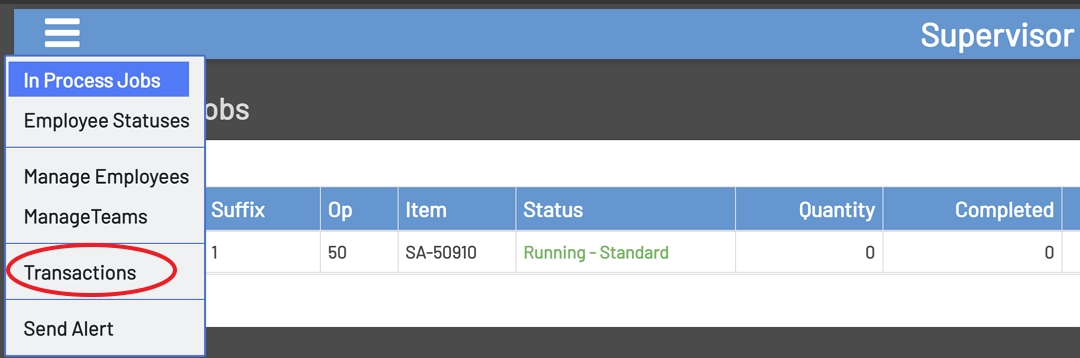
Once in the main Supervisor screen, click the hamburger menu in the upper left corner of the screen. From there, select the Transactions option from the menu.
Transactions Option
Transaction Selection Fields
To view Transactions, the fields below have to be populated.
-
Transaction Type: This is the type of transaction to view\edit and contains the options below.
-
Clock: This transaction will display Clock In, Clock Out, Break In, Break Out, Lunch In, and Lunch out transactions entered through Manufacturing Hub for a selected date range.
-
Indirect: This transaction will display Indirect transactions entered through Manufacturing Hub for a selected date range.
-
InProcess: This transaction will display transactions that are currently in process and have not been completed to the ERP system for a selected date range.
-
JIT: This transaction will display Just In Time transactions entered through Manufacturing Hub for a selected date range.
-
Machine: This transaction will display Machine transactions entered through Manufacturing Hub for a selected date range.
-
Move: This transaction will display Move transactions entered through Manufacturing Hub for a selected date range.
-
Run: This transaction will display Standard Job, Team Job, and Multi Job transactions entered through Manufacturing Hub for a selected date range.
-
Setup: This transaction will display Setup transactions entered through Manufacturing Hub for a selected date range.
-
-
Start Date: This is the Start Date for the date range of transactions to view.
-
End Date: This is the End Date for the date range of transactions to view.
Transaction Selection
