Each user in Prophecy can be assigned one or more roles. By default, after they create a new user account, they won't have any roles assigned to them - which means they can log in to Prophecy, but they won't be able to do much of anything.
Roles can be thought of as high-level permissions - they simply allow access to certain areas of Prophecy (namely, the below).
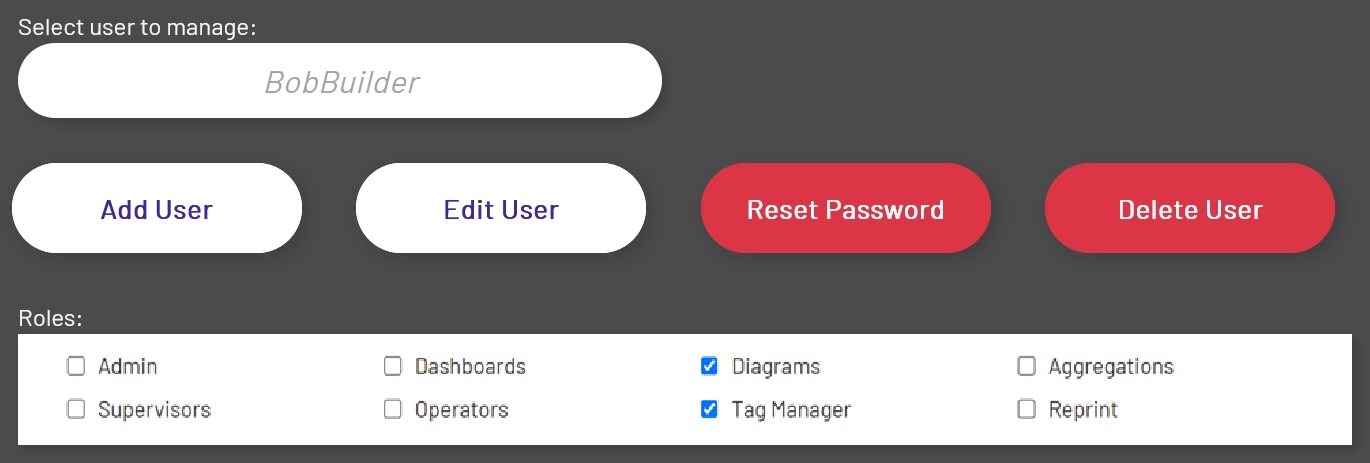
The roles in Prophecy are:
| Role | Description |
|---|---|
| Admin | Granting a user this role will give them access to ALL resources, system-wide. Do not assign this to anyone unless you truly want them to have this kind of power. |
| Aggregations | Users granted this role will be able to view, create, edit and delete Aggregations |
| Dashboards | Users granted this role will be able to view, create, edit and delete Dashboards |
| Diagrams | Users granted this role will be able to view, create, edit and delete Diagrams |
| Operators | Users granted this role will be able to fill in machine downtime data for machines and schedules they are assigned to |
| Supervisors | Users granted this role will be able to configure the machine downtime feature and fill in downtime data for all machines |
Assigning roles and permissions in Prophecy is done via the 'User Management/Permissions' tab under the Admin menu item on the user drop-down menu. See Navigation for more details.
To assign or remove roles for a user, log in as an admin, select a user from the drop-down, and simply check or uncheck the boxes:
Next, set Enterprise Explorer permissions, using the same form, if desired.