Database tags allow Prophecy users to consume complex data inside of their Diagrams from the data sources that are defined within their Prophecy installation. There are a few features it is important that the user becomes familiar with before utilizing db tags. The features are the Data Type manager and the Tag Manager, which can be accessed from the top right profile tab when the user navigates to the main prophecy site. I will provide an overview of these two features and how they can be used to create db tags and consume complex data.
The first step in creating a db tag is to define your data type. If you have not read the data type manager documentation it can be accessed here:
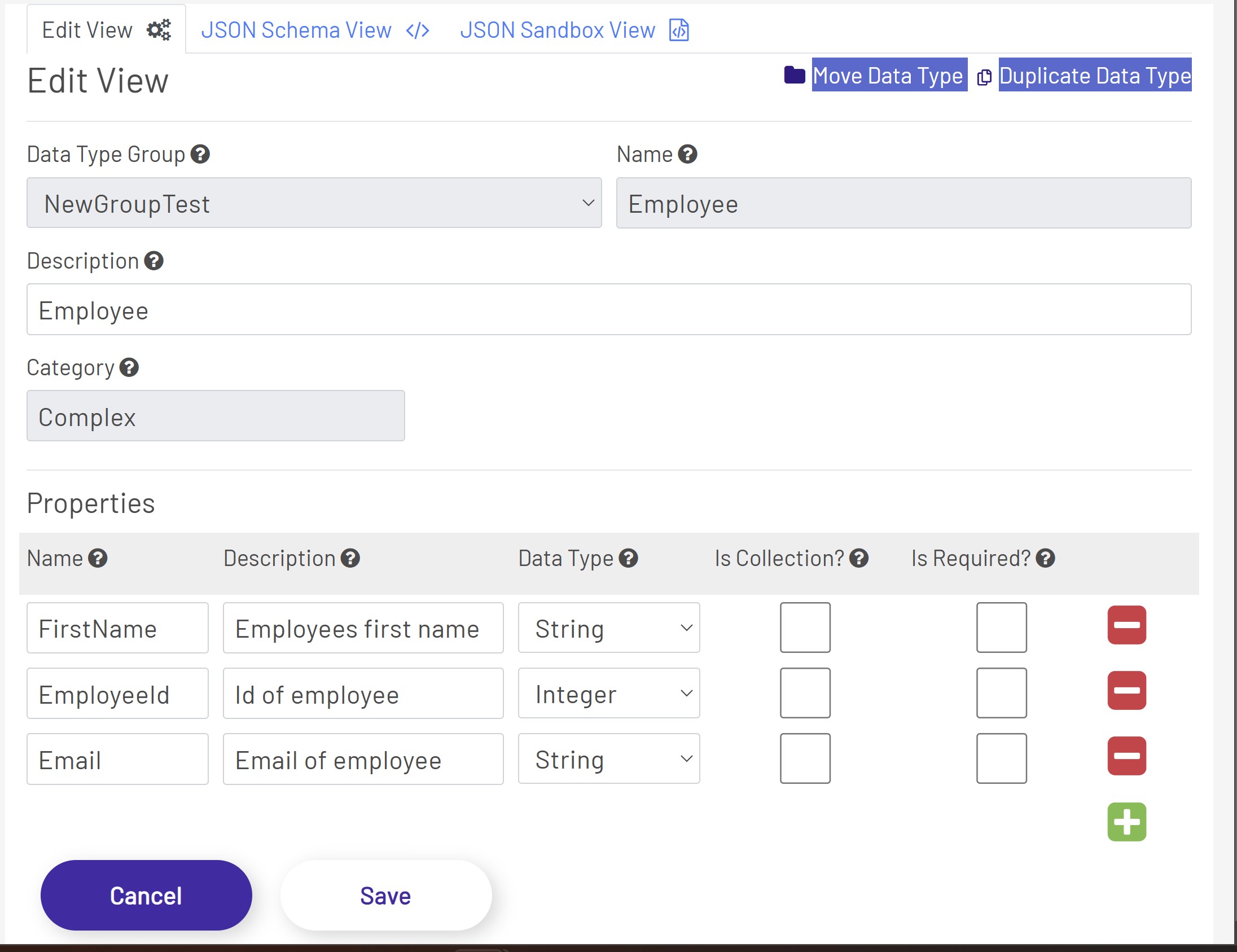
Once in the data type manager, you can define a complex type by adding a new data type. Here, we will provide the outline that will define our complex type. Note that this data type must match the data that the system is consuming exactly. So, it is pertinent that the user has access to the schema of the data type that they are defining before creating the type.
Here, we define an employee type:
The next step is to utilize the tag manager to create the tag that our complex employee data will be streamed through. Adding this tag manager tag will allow us to utilize the database tag to display live data in our Diagram. If you have not yet read the tag-manager documentation it can be found here:
- Define DB Tag: To define a db tag read the documentation here Define DB Tag.
After defining the DataType and DB Tag you are now ready to utilize this tag in a Diagram.
- Consume Complex Data In Diagram: To consume complex data in diagrams read here Consume Complex Data Diagrams