Prophecy allows site owners to vary the appearance of many elements of the site through the use of CSS. The software includes a blank stylesheet called 'custom.css' in the \css folder wherever Prophecy is installed. That stylesheet is loaded last, so (most) custom CSS added to that stylesheet will override the default appearance of Prophecy elements.
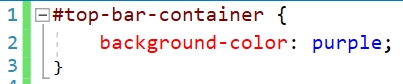
For example, someone familiar with CSS could change the standard site header color from grey:

...to purple:

...with a small change in the stylesheet:
CSS is a complex language so explaining its full usage is beyond the scope of this manual. There are many good tutorials available online, or you can contact the Prophecy Consulting Group for assistance in making customizations.
Upgrades
Once a site's custom.css file has been modified, be sure to keep a backup copy of it somewhere outside of the site so it can be restored if an unwanted change is made or it is lost during a Prophecy site upgrade.
Note that CSS is heavily dependent on the 'under the hood' structure of a page. As that structure can change between versions of Prophecy, it is important to view any pages you have created custom styles for immediately after each upgrade to ensure that your custom styling is still working properly.