Converting Dashboard Items
The Web Dashboard provides the capability to convert data-bound dashboard items to another type.
To convert the selected dashboard item to another type, use the dashboard item's Convert To menu.
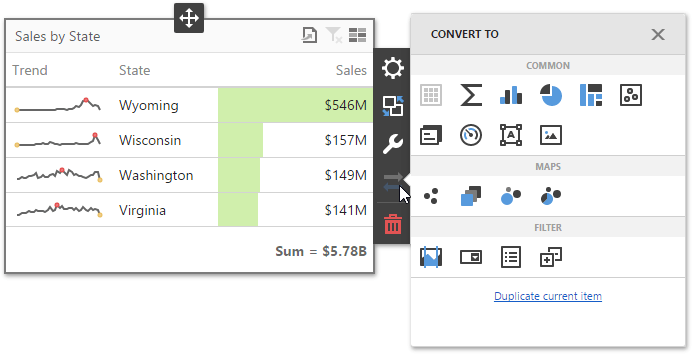
Note: You can also created a copy of the selected dashboard item using the Duplicate current item command.
The Web Dashboard always preserves the following settings for data-bound dashboard items.
-
The set of data items used to bind the dashboard item to data.
-
Data shaping settings of data items and their names.
-
A custom name displayed within the dashboard item caption.
The following settings are kept if the dashboard item is being converted to an item that also supports this feature.
-
Master Filtering settings (e.g., the specified master filter mode).
-
Drill-Down settings (e.g., the target dimension).
-
Conditional Formatting settings.
-
Coloring settings.
-
Calculation settings.
For different types of dashboard items, some specific settings can be preserved. For example, the following settings are preserved.
-
Legend settings for the Chart/Scatter Chart dashboard items.
-
Series types for the Chart/Range Filter dashboard items.
-
Element arrangement settings for the Pie/Card/Gauge dashboard items.
-
Navigation settings for Choropleth Map/Geo Point Maps.
-
The attribute whose values are displayed within shape titles for Choropleth Map/Geo Point Maps.
-
Legend settings for the Choropleth Map/Geo Point Maps.
-
Clustering settings for Geo Point Maps.