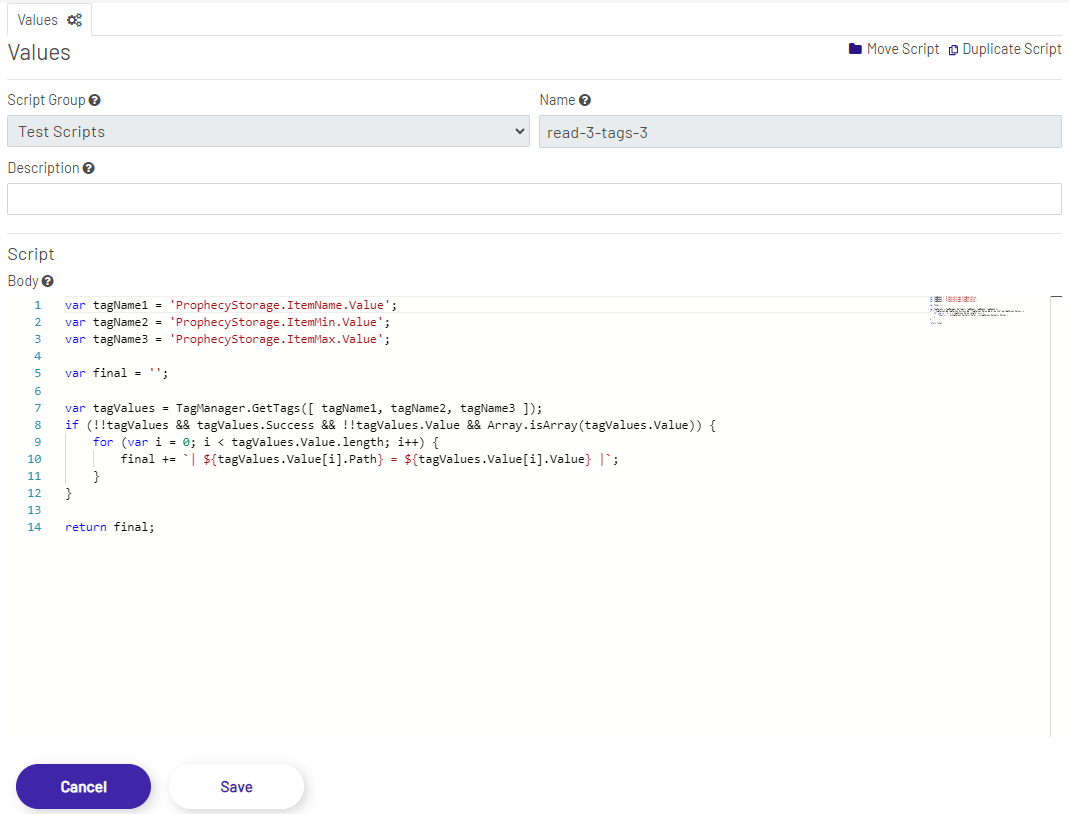
The Script Editor contains all the fields that can be set for a script in Prophecy. Script Group and Name are mandatory fields while the description is optional. The body is the code/logic of the script and provides a rich editor as an IDE. This mini-IDE provides line numbers on the left and a preview on the right, as well as JavaScript intellisense and autocomplete capabilities. Scripts need to be written in JavaScript that gets the execution context passed into it, and the execution host exposes a collection global objects as utilities, to be used inside any script.
Variables that get passed into scripts
- tagName - The name of the current tag. This would be the fully-qualified (Root.Groups.TagName.TagProperty) path with an example being "ProphecyScript.ERPValidationScripts.MachineTransactions.VerifiedTag.Value"
- tagScopeDiagram - The Diagram scope of the current tag. This is an implicit value and is the name of the Diagram that's calling this tag.
- tagScopeLocation - The location scope of the current tag. This is an explicitly set value and is taken from the "workcenter" query parameter.
Global Objects and Methods
-
TagValueManager - Helper object for tag value manipulation. Can be used to read from and write to any tag.
-
TagValueManager.Get(tags, tagScopeDiagram, tagScopeLocation)
The Get method is used to get tag values. This method takes 3 arguments:
tags - The list of tags for which the values are to be retrieved for. This argument is an array of strings with each string representing the fully-qualified name of the tag (e.g. ProphecyIoT.SiteAustinTX.Line17.Blender021.SpeedRPM.Value). The list could include any number of tags and the tags could be of any type. For example, a single Get call could be used to retrieve collections of machine tags, storage tags, ERP tags, DB tags, calculation tags, and other script tags.
tagScopeDiagram - The Diagram scope that will be used to fetch the tags. The scope values are only applicable to storage and script tags, and the value is usually the scope that gets passed into the current script, but a different value would be passed in to impersonate any Diagram (i.e. script tag being called by Diagram A, but Diagram B is passed into Get by the script tag to get the value as seen by Diagram B, into Diagram A).
tagScopeLocation - The location scope that will be used to fetch the tags. The scope values are only applicable to storage and script tags, and the value is usually the scope that gets passed into the current script, but a different value would be passed in to impersonate any location (i.e. script tag being used at location X, but location Y is passed into Get by the script tag to get the value as seen by location Y, into location X).
output - The get method returns an array of tags. To retrieve a tag and its value from the tag array returned, the index of the value object can be used. Ex. 'TagValueManager.Get(['ProphecyStorage.IdmItem.Value']).Value[0].Value'.
The Get method returns an array with the properties listed below:
Get Output Object Path Value Quality Type js var values = TagValueManager.Get( [ 'ProphecyIoT.Blenders.Tag-2391.Value', 'ProphecyDB.Configs.BlenderMonitoringConfigs.Value' ], 'Diagram-Operator-BlenderMonitoring', 'Location-WorkCenter-5A' ); -
TagValueManager.Set(tags, tagScopeDiagram, tagScopeLocation)
The Set method is used to set tag values. This method takes 3 arguments:
tags - The list of tags whose values are being set. This argument is an array of objects where each object has a tag property and a value property. The tag property is the fully-qualified name of the tag whereas the value property is the value that's being assigned to that tag. The list could include any number of tags and the tags could be of any type. For example, a single Set call could be used to set the values of collections of machine tags, storage tags, ERP tags, DB tags, and other script tags.
tagScopeDiagram - The Diagram scope that will be used to set the tags. The scope values are only applicable to storage and script tags, and the value is usually the scope that gets passed into the current script, but a different value would be passed in to impersonate any Diagram (i.e. script tag being called by Diagram A, but Diagram B is passed into Set by the script tag to set the value to emulate Diagram B setting the value).
tagScopeLocation - The location scope that will be used to set the tags. The scope values are only applicable to storage and script tags, and the value is usually the scope that gets passed into the current script, but a different value would be passed in to impersonate any location (i.e. script tag being used at location X, but location Y is passed into Set by the script tag to set the value to emulate location Y setting the value).
js
TagValueManager.Set(
    [
        {
            'tag': 'ProphecyIoT.Blenders.Tag-2391.Value',
            'value': 1200
        },
        {
            'tag': 'ProphecyIoT.Blenders.Tag-0855.Value',
            'value': 2310
        }
    ],
    'Diagram-Operator-BlenderMonitoring',
    'Location-WorkCenter-5A'
);
-
-
ApiValueManager - The APiValueManager is a helper object for consuming APIs. This helper method can be used to connect to any system that exposes a REST API. The ApiValueManager returns a normalized object for all API calls that are made. If using a document\image endpoint, a normalized image object is returned as part of the normalized API object. For API calls that need authentication headers or customer headers, a normalized header object should be passed into the ApiValueManager method. See the chart below for a description of these objects.
Note: Consuming APIs requires knowledge of the API being consumed. This includes the API parameters, the JSON object being returned, and the JSON object for errors that are returned when the calls are not successful.
-
API Response Object
Property Description Success A true or false value representing whether or not the API call succeeded StatusCode A string value containing the status code from the API call ErrorMessage A serialized string representation of the error response if the API call was not successful. ResponseObject A serialized string representation of the object returned from the API, if the API call returns data -
Image Response Object
If calling one of the GetImage mehtods in the ApiValueManager, then the response object above will contain a serialized representation of the object below:
Property Description Base64Image A base 64 encoded string of the image or document ImageData A byte array containing all bytes of the image or document -
API Header Object
If calling an authentication endpoint that requires an auth header or if calling an API that requires a custom header, then a header object will need to be passed into the API call. The API header object will need to be a serialized object array of the object below:
Property Description headerKey The key of the header object headerValue The value of the header object -
ApiValueManager GetOauthToken Method
The ApiValueManager exposes a method to retrieve an open authentication token that can be used when calling APIs that use open authentication authorization. The token retrieved from this call can be passed into the 'FetWithBearerToken' method. This method returns the 'API Response Object' mentioned above.
-
GetOauthToken(string url, string authHeaders, string mediaType = "application/json")
url - The API endpoint URL. This should be passed in as a string and is a required argument.
authHeaders - The headers required by the authentication method. A serialized header object array is required when using this method. An example would be 'JSON.stringify([ { headerKey: 'client_id', headerValue: 'ClientId' }, { headerKey: 'client_secret', headerValue: 'Secret' }, { headerKey: 'grant_type', headerValue: 'client_credentials' } ])'.
mediaType - The optional media type that can be passed into the method. Any valid media type can be passed in. The default is 'application/json'. This can be overridden by passing in a value other than the default value.
js
var url = "https://auth.myprophecyurl.com/connect/token";
var authHeaders = JSON.stringify([
        { headerKey: 'client_id', headerValue: 'ClientId' },
        { headerKey: 'client_secret', headerValue: 'ClientSecret' },
        { headerKey: 'grant_type',  headerValue: 'client_credentials' }
    ]);
var response = ApiValueManager.GetOauthToken(url, authHeaders);
///Further processing with javascript here
-
-
ApiValueManager Fetch Methods
The ApiValueManager exposes four fetch methods that are used for making API calls. All four methods accept a URL, HTTP verb, optional payload, optional custom headers object, and an optional media type. The default media type for all four is 'application/json', the more common media type for REST API calls. The media type can be overridden when needed. The only difference between the four methods is the additional parameters needed when making calls that require a specific authentication type. All four methods will accept one of the four HTTP verbs below.
Verb Description get Get requests are typically used to retrieve data from an API. The response is typically a serialized JSON object. post Post requests are typically used to send information to an API endpoint. They may or may not require a serialized JSON object in the payload (request body) and may or may not return a serialized JSON object. put Put requests are typically used to update a resource in an API. They typically require a serialized JSON object in the payload (request body) and may or may not return a serialized JSON object. delete Delete requests are used to remove a resource. Delete requests typically require a resource ID as part of the URL. No Authentication
-
Fetch(string url, string httpMethod, string payload, string customHeaders = null, string mediaType = "application/json")
The Fetch method is used to call an API that does not require credentials, meaning that the call can be made unauthenticated. The 'Fetch' method contains the arguments listed below:
url - The API endpoint URL. This should be passed in as a string and is a required argument.
httpMethod - The HTTP verb to dictate the type of call being made. This should be passed in as a string and is a required argument. The options are 'get', 'post', 'put', and 'delete'.
payload - The optional payload that can be passed into the API. A serialized JSON object is required when passing in a payload. An example would be 'JSON.stringify({id: 1, value: 2})'.
customHeaders - The optional headers that can be passed to the API. A serialized header object array is required when passing in a customer header. Reference the API HeaderOjbect above. An example would be 'JSON.stringify([{headerKey: 'header', headerValue: 'test'}])'.
mediaType - The optional media type that can be passed into the method. Any valid media type can be passed in. The default is 'application/json'. This can be overridden by passing in a value other than the default value.
js
var apiCall = ApiValueManager.Fetch(
    'http://localhost:1880/start-job-test',
    'post',
    JSON.stringify({ id: 81239, firstName: 'Jane', lastName: 'Doe' })
);
//Further processing with javascript here
OAuth Bearer Token
-
FetchWithBearerToken(string url, string httpMethod, string payload, string token, string customHeaders = null, string mediaType = "application/json")
The 'FetchWithBearerToken' method is used to call an API that requires an open authentication bearer token. The token can be acquired using the 'GetOauthToken' method mentioned above. The 'FetchWithBearerToken' method contains the arguments listed below:
url - The API endpoint URL. This should be passed in as a string and is a required argument.
httpMethod - The HTTP verb to dictate the type of call being made. This should be passed in as a string and is a required argument. The options are 'get', 'post', 'put', and 'delete'.
payload - The optional payload that can be passed into the API. A serialized JSON object is required when passing in a payload. An example would be 'JSON.stringify({id: 1, value: 2})'.
token - The OAuth bearer token for the API. The oauth token should be passed in as a string.
customHeaders - The optional headers that can be passed to the API. A serialized header object array is required when passing in a customer header. Reference the API HeaderOjbect above. An example would be 'JSON.stringify([{headerKey: 'header', headerValue: 'test'}])'.
mediaType - The optional media type that can be passed into the method. Any valid media type can be passed in. The default is 'application/json'. This can be overridden by passing in a value other than the default value.
js
var apiCall = ApiValueManager.FetchWithBearerToken(
        idmUrl,
        'get',
        null,
        responseObject.access_token
    );
//Further processing with javascript here
API Key
-
FetchWithApiKey(string url, string httpMethod, string payload, string apiKey, string customHeaders = null, string mediaType = "application/json")
The 'FetchWithApiKey' method is used to call an API that requires an Api key. The API key should be obtained from the API that is being consumed. The 'FetchWithApiKey' method contains the arguments listed below:
url - The API endpoint URL. This should be passed in as a string and is a required argument.
httpMethod - The HTTP verb to dictate the type of call being made. This should be passed in as a string and is a required argument. The options are 'get', 'post', 'put', and 'delete'.
payload - The optional payload that can be passed into the API. A serialized JSON object is required when passing in a payload. An example would be 'JSON.stringify({id: 1, value: 2})'.
apiKey - The API key provided by the API. The API key should be passed in as a string.
customHeaders - The optional headers that can be passed to the API. A serialized header object array is required when passing in a customer header. Reference the API HeaderOjbect above. An example would be 'JSON.stringify([{headerKey: 'header', headerValue: 'test'}])'.
mediaType - The optional media type that can be passed into the method. Any valid media type can be passed in. The default is 'application/json'. This can be overridden by passing in a value other than the default value.
js
var mondayGraphQlQuery = JSON.stringify({query: 'query{ me {name}}'});
var apiKey = ApiValueManager.FetchWithApiKey(
        'https://api.monday.com/v2',
        'post',
        mondayGraphQlQuery,
        'apiKey here'
    )
//Further processing with javascript here
User Credentials
-
FetchWithUserCredentials(string url, string httpMethod, string payload, string userName, string password, string customHeaders = null, string mediaType = "application/json")
The 'FetchWithUserCredentials' method is used to call an API that requires user credential authentication. The user credentials should exist and have proper permissions in the API that is being consumed. The 'FetchWithUserCredentials' method contains the arguments listed below:
url - The API endpoint URL. This should be passed in as a string and is a required argument.
httpMethod - The HTTP verb to dictate the type of call being made. This should be passed in as a string and is a required argument. The options are 'get', 'post', 'put', and 'delete'.
payload - The optional payload that can be passed into the API. A serialized JSON object is required when passing in a payload. An example would be 'JSON.stringify({id: 1, value: 2})'.
userName - The user name for a user that exists in the API.
password - The password for the user.
customHeaders - The optional headers that can be passed to the API. A serialized header object array is required when passing in a customer header. Reference the API HeaderOjbect above. An example would be 'JSON.stringify([{headerKey: 'header', headerValue: 'test'}])'.
mediaType - The optional media type that can be passed into the method. Any valid media type can be passed in. The default is 'application/json'. This can be overridden by passing in a value other than the default value.
js
var apiCall = ApiValueManager.FetchWithUserCredentials(
        idmUrl,
        'get',
        null,
        'userName here',
        'password here'
    );
//Further processing with javascript here
-
-
ApiValueManager Get Document/Image Methods
The ApiValueManager exposes four get image methods that are used for returning base64 string data or binary arrays from APIs. All four methods accept a URL, an optional custom headers object, and an optional media type. The default media type for all four is 'application/octet-stream', the more common media type for API calls that return media. The media type can be overridden when needed. The only difference between the four methods is the additional parameters needed when making calls that require a specific authentication type. All these methods perform HTTP Get requests and all return an Image Response Object in the Response Object property of the API response object mentioned above.
No Authentication
-
GetImage(string url, string customHeaders = null, string mediaType = "application/octet-stream")
The GetImage method is used to call an image/document API that does not require credentials, meaning that the call can be made unauthenticated. The 'GetImage' method contains the arguments listed below:
url - The API endpoint URL. This should be passed in as a string and is a required argument.
customHeaders - The optional headers that can be passed to the API. A serialized header object array is required when passing in a customer header. Reference the API HeaderOjbect above. An example would be 'JSON.stringify([{headerKey: 'header', headerValue: 'test'}])'.
mediaType - The optional media type that can be passed into the method. The media type for this type of call will most likely not need to be overridden.
js
var apiCall = ApiValueManager.GetImage(
    'http://www.imageendpoint.com');
//Further processing with javascript here
OAuth Bearer Token
-
GetImageWithBearerToken(string url, string token, string customHeaders = null, string mediaType = "application/octet-stream")
The GetImageWithBearerToken method is used to call an image/document API that requires an OAuth bearer token. The token can be acquired using the 'GetOauthToken' method mentioned above. The 'GetImageWithBearerToken' method contains the arguments listed below:
url - The API endpoint URL. This should be passed in as a string and is a required argument.
token - The OAuth bearer token for the API. The oauth token should be passed in as a string.
customHeaders - The optional headers that can be passed to the API. A serialized header object array is required when passing in a customer header. Reference the API HeaderOjbect above. An example would be 'JSON.stringify([{headerKey: 'header', headerValue: 'test'}])'.
mediaType - The optional media type that can be passed into the method. The media type for this type of call will most likey not need to be overriden.
js
var apiCall = ApiValueManager.GetImageWithBearerToken(
    'http://www.imageendpoint.com',
    responseObject.access_token);
//Further processing with javascript here
API Key
-
GetImageWithApiKey(string url, string apiKey, string customHeaders = null, string mediaType = "application/octet-stream")
The 'GetImageWithApiKey' method is used to call an API that requires an Api key. The API key should be obtained from the API that is being consumed. The 'GetImageWithApiKey' method contains the arguments listed below:
url - The API endpoint URL. This should be passed in as a string and is a required argument.
apiKey - The API key provided by the API. The API key should be passed in as a string.
customHeaders - The optional headers that can be passed to the API. A serialized header object array is required when passing in a customer header. Reference the API HeaderOjbect above. An example would be 'JSON.stringify([{headerKey: 'header', headerValue: 'test'}])'.
mediaType - The optional media type that can be passed into the method. The media type for this type of call will most likey not need to be overriden.
js
var apiCall = ApiValueManager.GetImageWithApiKey(
        'http://www.imageendpoint.com',
        'apiKey here'
    )
//Further processing with javascript here
User Credentials
-
GetImageWithUserCredentials(string url,string userName, string password, string customHeaders = null, string mediaType = "application/octet-stream")
The 'FetchWithUserCredentials' method is used to call an API that requires user credential authentication. The user credentials should exist and have proper permissions in the API that is being consumed. The 'FetchWithUserCredentials' method contains the arguments listed below:
url - The API endpoint URL. This should be passed in as a string and is a required argument.
userName - The user name for a user that exists in the API.
password - The password for the user.
customHeaders - The optional headers that can be passed to the API. A serialized header object array is required when passing in a customer header. Reference the API HeaderOjbect above. An example would be 'JSON.stringify([{headerKey: 'header', headerValue: 'test'}])'.
mediaType - The optional media type that can be passed into the method. The media type for this type of call will most likey not need to be overriden.
js
var apiCall = ApiValueManager.GetImageWithUserCredentials(
        idmUrl,
        'userName here',
        'password here'
    );
//Further processing with javascript here
-
Read Examples
- Read a machine tag and a storage tag, and return the greater value (on error, return 0). The tags names are hardcoded in the script:
var machineTagName = 'ProphecyIoT.Factory07.Machine13.Sensor809.Value';
var storageTagName = 'ProphecyStorage.ConfigValues.SensorValueConfig.Value';

try {
    var responses = TagValueManager.Get(
        [ machineTagName, storageTagName ], // Request the values of the 2 tags.
        tagScopeDiagram,                    // Pass the Diagram scope that gets passed into the script.
        tagScopeLocation                    // Pass the location scope that gets passed into the script.
    );

    if (
        !!responses &&                      // The response is not null AND
        responses.Success &&                // The response is successful AND
        !!responses.Value &&                // The response value is not null AND
        Array.isArray(responses.Value) &&   // The response value is an array AND
        responses.Value.length === 2        // The response has values for 2 tags
    ) {
        // Compare the 2 values and return the larger one.
        return responses.Value[0].Value > responses.Value[1].Value
            ? responses.Value[0].Value
            : responses.Value[1].Value;
    }
    else {
        // If tag value retrieval is unsuccessful, return 0.
        return 0;
    }
}
catch (e) {
    // If there are exceptions, return 0.
    return 0;
}
- Read a tag name convention from a storage tag, read in all the values from all the tags that match the convention (simple prefix + index pattern), calculate the average, log errors to a DB as well an error tag to be used by Diagrams, and return the average. Accessing values and indexes without the proper checks is not advised! It's done in this example for brevity and any errors would be caught by the exception handling, but explicit checking and validation is the better practice:
var tagNameConventionTag = 'ProphecyStorage.Config.MachineTagPrefix.Value';

try {
    // Scope parameters are optional and can be omitted. This will default the call to
    // the internal default scopes, which are shared between all Diagrams and locations.
    var tagNameConvention = TagValueManager.Get([ tagNameConventionTag ]).Value[0].Value;

    // Create a tag name array of 20 entries based on the convention.
    var tagNames = [...Array(20).keys()]
        .map(x => x.toString().padStart(3, '0'))
        .map(x => `${tagNameConvention}${x}`);

    // Get the values for all 20 tags (if they exist).
    var values = TagValueManager.Get(tagNames).Value.map(x => x.Value);

    // Find the average of the returned values.
    var average = values.reduce((a, n) => a + n) / values.length;

    // Turn off the error flag as everything has been executed successfully.
    TagValueManager.Set([{ tag: 'ProphecyStorage.Config.HasErrors.Value', value: false }]);

    return average;
}
catch (e) {
    // Warning: this call itself could throw an exception! This could be wrapped in a
    // nested try/catch block to prevent this.
    // Turn on the error flag, set the error message, and log the error to a DB tag.
    TagValueManager.Set([
        { tag: 'ProphecyStorage.Config.HasErrors.Value', value: true },
        { tag: 'ProphecyStorage.Config.ErrorMessage.Value', value: e.message },
        {
            tag: 'ProphecyDB.System.Errors.Value',
            value: JSON.stringify({
                message: e.message,
                stack: e.stack,
                diagram: tagScopeDiagram,
                location: tagScopeLocation,
                timestamp: Date()
            })
        }
    ]);
}
Write Examples
- When a storage tag is being written to, check to make sure that the value is within bounds of a pair a config values read from a database tag, write 0 if the value is out of bounds, and log any errors. Preserve the scopes so that the underlying tag respects them:
var upperBoundTag = 'ProphecyStorage.Config.UpperBoundTag.Value';
var lowerBoundTag = 'ProphecyStorage.Config.LowerBoundTag.Value';
var storageTag = 'ProphecyStorage.CuratedValue.Value';

try {
    // Get the upper and lower bound values.
    var tagValues = TagValueManager.Get([ upperBoundTag, lowerBoundTag ]);

    // Check the upper and lower bounds (inclusive test). The 'tagValue' variable holds
    // the incoming tag value.
    var upperBound = tagValues.find(x => x.tag === upperBoundTag).value;
    var lowerBound = tagValues.find(x => x.tag === lowerBoundTag).value;
    var curatedValue = tagValue >= lowerBoundTag && tagValue <= upperBoundTag ? tagValue : 0;

    // Save the curated tag value, and pass in the scopes that are passed into the script.
    // 'tagScopeDiagram' and 'tagScopeLocation' variables hold the incoming scope values.
    TagValueManager.Set([{ tag: storageTag, value: tagValue }], tagScopeDiagram, tagScopeLocation);
}
catch (e) {}
- Take in a collection of records, validate, sanitize, and write the values to an ERP tag, which will post multiple CSI transactions. Write the errors to a series of tags used to notify the Diagrams as well as log entries to a database using a DB tag.
var warningIndicatorTag = 'ProphecyStorage.Indicators.DowntimeTransactions.Value';
var warningMessageTag = 'ProphecyStorage.Messages.DowntimeTransactions.Value';
var downtimeTransactionErpTag = 'ProphecyERP.Transactions.Downtime.Value';

try {
    // Validate the syntax to make sure that the records have the necessary fields.
    // The validation is to make sure that all the records are valid downtime transactions.
    var isValid = !!tagValue && Array.isArray(tagValue);
    tagValue.forEach(x => {
        if (
            !x.downtimeCode ||
            !x.shift ||
            !x.aHrs ||
            !x.job ||
            !x.suffix ||
            !x.wc ||
            !x.operNum ||
            !x.resid ||
            !x.startTime ||
            !x.endTime ||
            x.startTime > x.endTime
        ) {
            isValid = false;
        }
    });

    // If the records are not valid, set a warning and exit. The warnings and messages could be
    // more elaborate and could potentially log the exact invalid record as well as the specific
    // problem.
    if (!isValid) {
        TagValueManager.Set([
            { tag: warningIndicatorTag, value: false },
            { tag: warningMessageTag, value: 'One or more downtime transactions are invalid.' }
        ],
        tagScopeDiagram,
        tagScopeLocation);

        return;
    }
    else {
        TagValueManager.Set([{ tag: warningIndicatorTag, value: true }], tagScopeDiagram, tagScopeLocation);
    }

    // Sanitize the downtime transactions.
    var now = new Date();
    tagValue.forEach(x => {
        x.TransType = 'T';
        x.TransDate = now;
        x.UserCode = 'SLI';
    });

    // Post the transactions.
    var transactions = tagValue.map(x => ({ tag: downtimeTransactionErpTag, value: x }))
    TagValueManager.Set(transactions);
}
catch (e) {
    TagValueManager.Set([
        { tag: warningIndicatorTag, value: false },
        { tag: warningMessageTag, value: `Error posting downtime transactions: ${e.message}` }
    ],
    tagScopeDiagram,
    tagScopeLocation);
}
API Call with Image Return Example
- The below example makes a call to Mingle to retrieve an OAuth token using the 'GetOauthToken' method. It then checks if the token request was successful. If the token request was not successful, then the error message is written to a storage tag using the 'TagValueManager.Set' method. If the response was successful, then the 'TagValueManager.Get' method is called to retrieve an item number stored in a storage tag. This value is combined with other information to form the necessary URL to call an IDM endpoint to retrieve information about the document. The returned response is read to extract the Pid of the document. The Pid is combined with other information to create the URL that is needed to call an IDM stream endpoint. The image response is parsed, and the base 64 value is written to a storage tag using the 'TagValueManager.Set' method. This storage tag is later used in a diagram to display the image.
Note: Consuming APIs from the Infor OS requires an app registration to be created before an auth token can be issued. Propper permissions are required to access any API in this space.
//set the url variable
var authUrl = "https://mingle-sso.inforcloudsuite.com:443/Tennant/as/token.oauth2";

//create an auth header object array
var authHeaders = JSON.stringify([
        { headerKey: 'grant_type', headerValue: 'password' },
        { headerKey: 'username', headerValue: 'username' },
        { headerKey: 'password', headerValue: 'password' },
        { headerKey: 'client_id', headerValue: 'clientId' },
        { headerKey: 'client_secret', headerValue: 'secret' }
    ]);

//call the GetOauthToken endpoint
var response = ApiValueManager.GetOauthToken(authUrl, authHeaders);

//check the status in the returned API response object
if(!response.success){
    //parse the error message if not successful
    var responseError = JSON.parse(response.errorMessage);

    //write the error message to a tag
    var setTag = TagValueManager.Set([{ tag: 'ProphecyStorage.TokenTagError.Value', value: response.errorMessage }],
        null, null);
}
else{
    //get the item stored in a storage tag
    var item = TagValueManager.Get(['ProphecyStorage.IdmItem.Value']).Value[0].Value;

    //parse the response GetOauth token response
    var responseObject = JSON.parse(response.responseObject);

    //set the idm URL
    var idmUrl = "https://mingle-ionapi.inforcloudsuite.com/GODLAN_AX3/IDM/api/items/"
        + "search?%24query=%2FMDS_GenericDocument%5B%40MDS_id1%3D%22" + item + "%22%5D&%24offset=0&%24limit=5";

    //call the idm endpoint and pass in the token returned from the GetOauth token request
    var documents = ApiValueManager.FetchWithBearerToken(
        idmUrl,
        'get',
        null,
        responseObject.access_token
    );

    //parse the response
    var docContent = JSON.parse(documents.responseObject);

    //extract the item object and get the last pid in the collection
    var docs = docContent.items.item;
    var lastPid = docs[docs.length - 1].pid;

    //create the stream endpoint using the pid from above
    var streamUrl = `https://mingle-ionapi.inforcloudsuite.com/Tennant/IDM/api/items/${lastPid}/resource/stream`;

    //call the GetImageWithBearerToken method and pass in the url and OAuth token
    var imageStream = ApiValueManager.GetImageWithBearerToken(
        streamUrl,
        responseObject.access_token
    );

    //parse the response
    var imageResponse = JSON.parse(imageStream.responseObject);

    //write the base 64 property to a storage tag
    var testVal = TagValueManager.Set([{ tag: 'ProphecyStorage.ImageTesting.Value',
        value: imageResponse.Base64Image}],
        null, null);
}

return [];